

Every quick share vs airdrop android iphone comparison runs into the same wall in the first paragraph, so here it is plainly: the two systems do not talk to each other. Quick Share is Android’s (and Windows’) nearby sharing system, built by Google and Samsung. AirDrop is Apple’s system, and it works only between Apple devices — iPhone, iPad, and Mac. An Android phone cannot AirDrop to an iPhone, and no setting changes that. What this guide can usefully compare is how fast each system is inside its own ecosystem, how each one works, and what you should use instead when the two phones in front of you run different systems.
| Feature | Quick Share | AirDrop |
|---|---|---|
| Works on | Android 6.0+, Windows 10/11 PCs, Chromebooks | iPhone, iPad, Mac only |
| Discovery radios | Bluetooth, then Wi-Fi Direct or local Wi-Fi | Bluetooth LE, then peer-to-peer Wi-Fi |
| Internet needed | No for nearby transfer; optional cloud link sharing | No |
| Cross-platform to the other system | No | No |
| Typical nearby speed | Roughly 20–60 MB/s on modern phones, typical reported range | Roughly 25–60 MB/s between recent models, typical reported range |
How each system actually moves your file
Both systems use the same two-stage design. Bluetooth handles discovery: your phone finds nearby devices without draining the battery. Once the recipient accepts, the file travels over a fast Wi-Fi connection. Bluetooth never carries the big file, which is why turning it off breaks discovery.
The differences are in the details. AirDrop creates a direct peer-to-peer Wi-Fi link between the two Apple devices, using Apple’s own wireless protocol, and it works even if neither device is connected to a Wi-Fi network. Quick Share on Android can also form a direct Wi-Fi Direct style connection, but depending on the devices and settings it may instead route through a shared local Wi-Fi network, and on Windows it works through the Quick Share for Windows app over your network. In practice both feel identical to the sender — tap, pick a name, wait for the progress bar — but Quick Share has one extra trick: it can fall back to generating a link or QR code that shares through Google’s servers when a direct connection is not possible, which does use the internet and your data.
Visibility settings you should understand
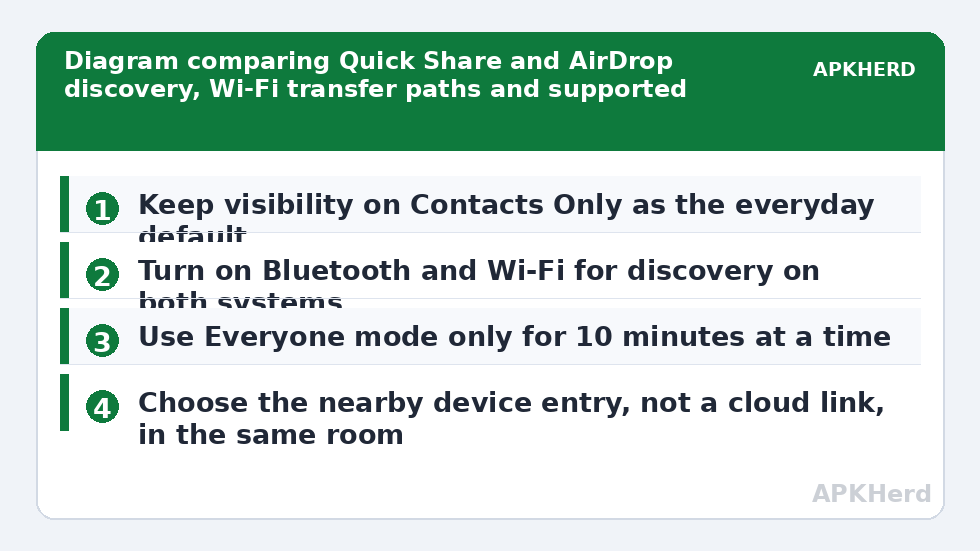
Quick Share offers visibility choices along the lines of No one, Contacts only, and Everyone for 10 minutes. AirDrop offers Receiving Off, Contacts Only, and Everyone for 10 Minutes. In both cases the 10-minute everyone mode exists for a reason: it lets a stranger send you a file at an airport gate or a conference without staying discoverable all day. Leave both systems on Contacts Only as your everyday default. Keeping either system set to Everyone permanently means anyone in radio range can attempt to send you files and will see your device name, which often includes your real name. The convenience is not worth that exposure, and both platforms now nudge you back to a safer default automatically.
quick share vs airdrop android iphone comparison: speed in practice
Headline Wi-Fi numbers mislead here, because a short nearby transfer spends a meaningful share of its time on discovery, negotiation, and starting the Wi-Fi link — fixed overheads of a few seconds that dominate a 20 MB photo set and barely register on a 3 GB video. For small batches of photos, both systems typically finish within seconds of each other, and the phone’s storage speed and photo processing matter as much as the radio.
For large videos, sustained throughput matters, and here recent flagship devices on both sides land in a similar band — commonly reported in the 25–60 MB/s range under good conditions, dropping sharply with distance, interference in a crowded venue, or an older phone at one end. A transfer is only as fast as the slower device: an older Android with slower Wi-Fi sending to a new Windows PC will set the pace for the whole transfer, and the same is true for an older iPhone sending to a new Mac. Neither system has a decisive real-world speed crown; both are dramatically faster than Bluetooth file transfer and dramatically faster than uploading to cloud storage and downloading again on the same desk.
Where they differ is consistency. AirDrop benefits from Apple controlling both ends, so behaviour is predictable across generations. Quick Share spans many makers plus Windows PCs, so it varies more: two modern Samsung or Pixel phones behave beautifully, while a budget Android on an old Wi-Fi chipset is noticeably slower.
Compatibility, stated completely
Quick Share runs on most Android phones with Android 6.0 or later, is built into Samsung Galaxy and Pixel devices, and extends to Windows through Google’s official app and to Chromebooks natively. The older Nearby Share name was merged into Quick Share, so an old menu with that name is the same system.
AirDrop requires Apple hardware with modern Wi-Fi and Bluetooth — in practice any iPhone from the iPhone 5 onward running a current-ish iOS, plus equivalent iPads and Macs from the last decade and more. It is not available on Windows, Android, or Linux, and Apple has never licensed it. Be wary of any third-party app that claims to add real AirDrop to Android: it cannot join Apple’s protocol, and at best it is a separate sharing app using the name loosely.
What to use instead when one phone is Android and one is iPhone
This is the situation most readers actually have, and the honest answer is a third tool. For a home network with a PC involved, LocalSend between Android and PC shows the local-network pattern that also works phone to phone, since LocalSend has an iOS app too. For a one-off send to someone on a different network, the six-digit key approach in our Send Anywhere cross-platform guide is usually the lowest-friction choice. If your real problem is preserving folders rather than single files, see how to send folders from Android to iPhone intact. All of these sit inside our broader file sharing collection alongside offline and browser-based methods.
Browser-based sharing also sidesteps installation entirely: two devices on the same network open the same sharing page and transfer directly. It is slower to set up, but when a phone has no free space for another app, it gets the job done.
Privacy and safety differences that matter
Both systems encrypt the transfer itself, and both show the recipient an accept prompt unless a device is set to receive from contacts or everyone automatically. The practical risks are social rather than cryptographic: an Everyone mode left on in a public place invites unwanted send attempts and image previews, and a device name like your full legal name broadcasts that name to everyone nearby. Rename your device to something neutral in settings on either platform — it takes a minute and follows you across every nearby-sharing system, not just these two.
Also be precise about the cloud fallback. If Quick Share offers to share by link or QR code instead of a direct transfer, that file goes through internet servers and whoever holds the link may be able to download it. That is a reasonable trade for reaching someone far away, but it is a different privacy model from a direct radio transfer in the same room, and the interface does not always make the distinction loud. Choose the nearby device entry, not the link, when the other person is standing next to you.
Which should you prefer?
Inside one ecosystem, prefer the built-in system: AirDrop between Apple devices, Quick Share between Android devices and Windows PCs. It is already installed, already updated, and understood by the people you send to. Across ecosystems, stop trying to make either system stretch and pick a cross-platform tool deliberately, based on whether a PC is involved, whether folders must survive, and whether the internet is available. That short decision, made once, ends the recurring frustration these comparison searches come from.
Frequently Asked Questions
Can an Android phone AirDrop to an iPhone?
No. AirDrop works only between Apple devices, and there is no setting or official app that lets Android join it. Use a cross-platform tool such as LocalSend or Send Anywhere for Android-to-iPhone transfers instead.
Is Quick Share faster than AirDrop?
In typical reported use they are in a similar range, roughly 25–60 MB/s between recent devices under good conditions. The slower device, distance, and interference affect the result far more than which system you use.
Does Quick Share work with Windows PCs?
Yes. Google’s Quick Share for Windows app lets supported Android phones send to and receive from Windows 10 and 11 PCs over your local network, as long as the PC has Wi-Fi and Bluetooth.
Why can the other phone not see my device?
Check visibility first: both systems hide you when set to No one or Receiving Off. Then confirm Bluetooth and Wi-Fi are on, unlock both phones, and bring them within a metre or two for discovery.
Do either of them use my mobile data?
A direct nearby transfer does not use mobile data on either system. Quick Share’s optional link and QR sharing does use the internet, because the file passes through online servers instead of going directly.