
For a decade, “root backup” meant one app. Ask titanium backup 2026 root worth it today and the answer requires separating nostalgia from maintenance reality: Titanium Backup’s development effectively stalled years ago, Android changed several rules underneath it, and two successors — Swift Backup and Neo Backup — now do its old job with modern Android support. This article gives Titanium a fair hearing for the specific cases where it still functions, then makes the replacement case plainly.
What Titanium Backup was, and what changed around it
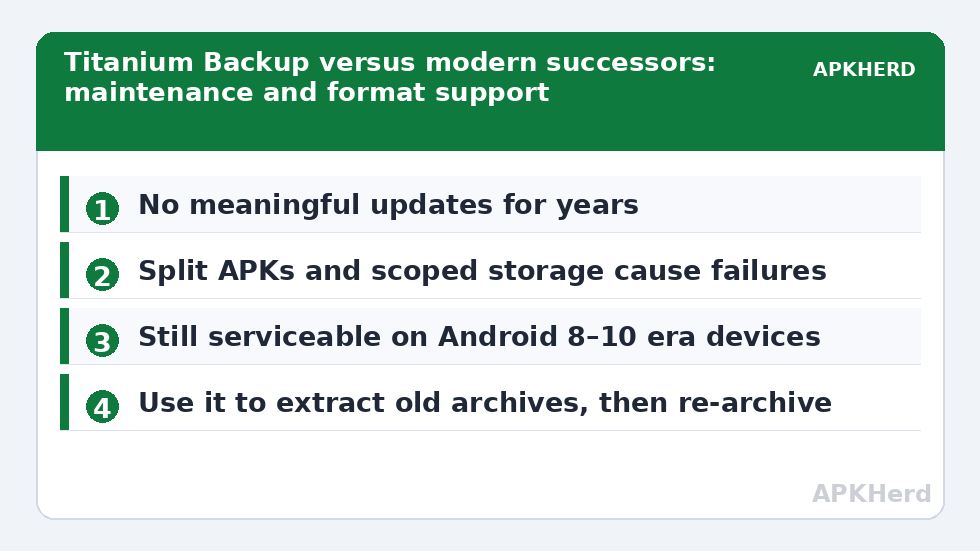
Titanium Backup pioneered user-app-plus-data archives on rooted phones: batch backup and restore, scheduling, freezing bloatware, and backups you could move between devices. Its model — read the data directories directly as root — remains technically sound. What changed is everything around the model. The app has not seen meaningful updates in years, while Android introduced scoped storage, split APKs as the default distribution format, stronger SELinux enforcement, and new restrictions on legacy storage access. An unmaintained app colliding with five generations of platform change produces the exact symptom pattern in recent reviews and forum threads: restores that hang, backups that silently exclude split components, and permission fights on Android 13–15.
Judge it against the present, not the legend — and note its sibling risk: a root tool from an unmaintained codebase is also a security consideration, since it holds the keys to every app’s data.
Head-to-head: Titanium versus the successors
| Capability | Titanium Backup | Swift Backup | Neo Backup |
|---|---|---|---|
| Actively maintained (recent Android support) | No | Yes | Yes |
| Split APK handling | Problematic in many reports | Yes | Yes |
| Full app data with root | Yes, where it still works | Yes | Yes |
| SMS/call logs | Yes (XML) | Yes | Version-dependent special backups |
| Scheduling | Yes | Premium | Yes |
| Source transparency | Closed | Closed | Open source |
Our dedicated guides cover the successors in depth: Swift Backup complete guide and the Neo Backup guide. Between them, Swift is the polished commercial option with the strongest message handling; Neo is the open-source purist’s choice. Both are safer recommendations in 2026 than the classic.
Titanium Backup 2026 root worth it? The narrow cases where it still earns its place
Fairness requires listing them. (1) Old devices: on Android 8–10 era hardware that will never update, Titanium still works as it always did, and archives from a decade ago remain restorable there. (2) Existing archives: if your only backup of something precious is an old Titanium folder, the app (on a compatible device) is the way to read it back — treat that as an extraction job, then re-archive with a modern tool. (3) Specific legacy features around system data migration on same-device ROM hopping had their fans; on modern Android those same tricks are precisely the ones most likely to cause bootloops, so this case is weaker than memory suggests.
If you are starting fresh in 2026: the decision path
- Rooted and want maximum data capture with polish → Swift Backup.
- Rooted and want open source with auditable code → Neo Backup.
- Not rooted → neither Titanium nor any tool can give full data; use the layered no-root approach from our pre-ROM layered guide instead of rooting solely for backups.
- Whatever you choose: encrypt the output folder before it leaves the device (encryption workflow) and run a restore test (restore testing routine).
The verdict
Respect the classic; do not deploy it as your 2026 plan. An unmaintained root tool on a modern Android release is a liability wearing a reputation. Titanium’s ideas won — every modern successor is its descendant — but the app itself belongs to the museum shelf next to the phones it once protected. Category hub: backup tools.
What actually broke: five years of platform change in one list
It is worth being concrete about why an app that was flawless in 2019 struggles now, because the same forces affect every tool in this category. Split APKs became the standard delivery format, so “the APK” is now a base plus configuration splits that old tooling may archive incompletely. Scoped storage fenced off shared storage paths that backup tools once roamed freely. Android’s backup framework itself shifted, with target-API rules changing allowBackup defaults and device-to-device transfer behaviour diverging from cloud backup behaviour. Keystore hardening means more apps bind data to hardware-backed keys that no file copy can transplant. And 64-bit-only and SDK-floor changes mean the phones themselves outgrew the era Titanium was built for. A maintained tool absorbs these shifts release by release; an unmaintained one accumulates them as mysterious failures. That, in one paragraph, is the whole verdict.
A respectful footnote on preservation
There is one more genuinely valuable Titanium use in 2026: archaeology. Old phones in drawers hold old Titanium folders, and old Titanium folders hold the only copies of app data from apps long delisted. If that is you, the workflow is to wake the old device (or a same-era spare), restore with Titanium there, open the apps and export their data in modern formats, and then archive those exports with current tools. Treat the classic app as a museum instrument for opening period archives — with gratitude, and with no plans to depend on it tomorrow. The broader principle generalizes across this whole category: formats and tools age out, but plain exports (files, .vcf, XML, open formats) survive every transition. Whenever a modern tool offers you an open-format export, take it, even if you also keep the native archive.
Migration path if you are still (mostly) on Titanium
If Titanium limps along on your current device and holds your archive history, do not rip it out in a panic — overlap instead. Install your chosen successor, run parallel backups for one cycle, and restore-test the successor’s output thoroughly. Once the new tool has proven itself with a real restore, retire Titanium to cold storage duty for its old archives only. Parallel-running for a month costs some gigabytes and buys certainty, which is the correct exchange rate in this category. And whatever era your archives come from, consolidate the final copies under the structure in our disaster plan so the next migration starts from order rather than archaeology.
One question from the comments, answered plainly
“But it still works on my phone” is the most common defence, and it deserves a straight answer: yes, on some devices, for some apps, it still works today — and reliability is not about today. A backup tool earns trust across the device’s whole life: the OS update in March, the phone change next year, the restore at the worst possible moment. An unmaintained tool’s failures arrive unscheduled and unexplained, and each platform release adds distance between the code and the system it manipulates. Working-until-it-doesn’t is the defining property of abandonware, and backups are the worst place in your digital life to host it.
Frequently Asked Questions
Does Titanium Backup still work on Android 14 or 15?
Reports are mixed-to-negative: split APKs, storage restrictions, and restore hangs are common. It may work for individual simple apps on some devices, but it is not a reliable whole-device strategy on modern releases.
Can the new tools read my old Titanium backups?
Not directly — the archive formats differ. To recover old data, restore it with Titanium on a compatible (usually older or permissive) device, then re-back-up with your modern tool of choice.
Is rooting my phone just to use these tools a good idea?
Rooting changes your security model and breaks some banking and DRM apps. If backups are the only motive, exhaust the no-root layered methods first; root because you want a custom ROM or system control, and treat full-data backup as a bonus.
What happened to Titanium Backup’s development?
Updates effectively stopped years ago while Android kept changing. No scandal, no shutdown announcement — just abandonment by silence, which is why the app remains downloadable yet increasingly unreliable.
Which successor is closest to Titanium’s feel?
Neo Backup is philosophically closest (batch archives, schedules, open toolbox feel) and open source; Swift Backup is the more guided, modern consumer experience. Both capture full app data with root.