The oneplus parallel apps oppo clone apps story is really one story told twice: OnePlus and Oppo are sister brands sharing the ColorOS/OxygenOS codebase, so their cloners are near-identical under the skin, differing mainly in name and menu wording. OnePlus calls it Parallel Apps; Oppo calls it App Cloner (labelled “Clone Apps” on some builds). Both support a curated-but-generous list of social and messaging apps, both mark clones with a small “2” or twin icon badge, and both share the same quirks. This guide uses both paths side by side so you can follow along on either brand.
Setup on OnePlus: Parallel Apps
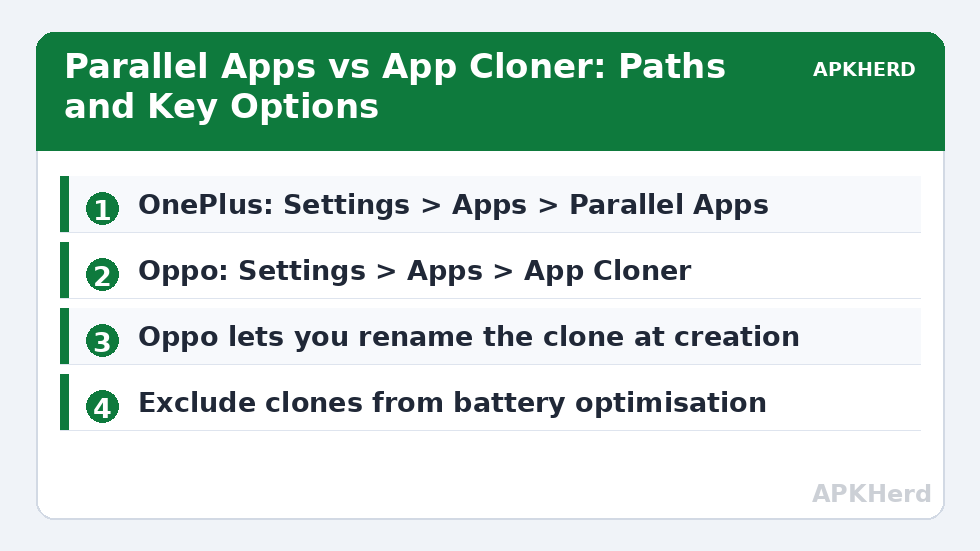
On OxygenOS 12 and later, open Settings > Apps > Parallel Apps (on some builds it sits under Settings > Utilities on older OxygenOS versions — the Settings search finds it instantly). The screen lists parallel-capable installed apps, typically WhatsApp, Telegram, Facebook, Messenger, Instagram, Snapchat, X, LinkedIn, and several regional messengers; the exact list depends on region and model. Toggle the app you want, wait a few seconds, and a badged clone appears in the app drawer. OxygenOS asks whether to create a home-screen shortcut; accept it, because drawer-only clones are easy to lose track of when both icons look identical at a glance.
Setup on Oppo: App Cloner
On ColorOS 12 and later, open Settings > Apps > App Cloner (some builds: Settings > App Management > App Cloner). Tap the app you want to duplicate, then enable Create app clone. ColorOS offers a genuinely thoughtful extra here: Rename clone, letting you label the copy “WhatsApp Work” instead of relying on the badge. Take the ten seconds to do it — renamed clones prevent the classic mistake of messaging your boss from the personal account. Oppo also provides a system-wide “choose which copy” prompt when a link can open in either version, which you can set to always ask or remember per app.
How the Clones Behave Day to Day
Parallel/clone copies are full independent installations: separate logins, separate data, separate notification settings. Updates arrive through the Play Store normally. Differences from stock Android cloners appear in the details. OxygenOS battery optimisation (especially “Advanced optimisation” and sleep standby) can starve clones of background time, producing the familiar delayed-message pattern; add messaging clones to the not-optimised list and disable deep sleep optimisation if you rely on the clone for work. ColorOS has an equivalent setting under Battery > Advanced settings. Storage cost is a full second copy of app data, the same trade-off as every OEM cloner.
One genuinely useful behaviour on both brands: the clone respects the brand’s app lock, so you can require a fingerprint to open the work copy while leaving the personal copy unlocked. Neither brand, however, offers Samsung-style separate contact lists — the clone sees your address book as a whole, so contact-based apps will suggest the same people to both accounts unless the app itself offers contact filtering.
When Clones Break: The Common Failure Modes
Three failures account for most complaints. First, a clone that crashes on launch after an app update: toggle the clone off and on again (this deletes its data, so back up first) — reinstallation of the clone fixes most cases, and the fuller diagnostic sequence is in our article on fixing cloned app crashes and notification problems. Second, push notifications that only sync when the app opens: almost always battery policy, addressed above. Third, links and files that open in the wrong copy: on Oppo, reset the per-app open-with preference in App Cloner; on OnePlus, clear defaults for both copies and let the system prompt again.
How This Compares With Samsung and Xiaomi
All three OEM cloners rest on the same Android multi-user foundations, but their philosophies differ. Samsung’s Dual Messenger supports the fewest apps and misbehaves the least; our Samsung Dual Messenger guide details that trade-off. Xiaomi’s Dual Apps clones nearly anything and trips over Google services more often; see the Xiaomi Dual Apps guide for its fixes. OnePlus/Oppo sit between the two on both axes — a respectable app list, occasional battery-related notification trouble, and Oppo’s rename-the-clone option that arguably every OEM should copy. Whichever brand you carry, the account rules are identical: these are legitimate platform features for separating your own accounts, and an app that forbids multiple accounts forbids them here just as much as anywhere else.
Removing Clones and Starting Over
Return to Parallel Apps or App Cloner settings and toggle the app off; the system warns that the clone’s data will be deleted, and it means it. There is no export or merge tool. After removal, the original app is untouched. If you are removing a clone because you are moving the account to a different phone or profile, migrate the account inside the app first (messengers have their own transfer flows), then delete the empty clone. Additional cloning guides for both brands are gathered under App Cloners.
Do Not Overlook: System Cloner on Newer OxygenOS
Recent OxygenOS versions (13 and later on many models) include a second, easily missed feature called System Cloner, found under Settings > Privacy. It is not an app cloner at all — it creates a separate system profile with its own lock-screen entry, apps, and data, closer in spirit to Xiaomi’s Second Space than to Parallel Apps. If your real goal is a whole work environment on the phone rather than a twin of one or two apps, System Cloner is the stronger tool, and it explains why some OnePlus owners find Parallel Apps’ app list oddly short: OnePlus expects environment-level duplication to happen there. Oppo’s ColorOS has no direct equivalent on most builds, which is one of the few meaningful divergences between the sister platforms. Choose deliberately: Parallel Apps/App Cloner for a second account in one app; System Cloner (or a work profile) when the boundary should surround a set of apps, files, and accounts together.
Cloning Games and Heavy Apps: Temper Expectations
Both brands will happily offer toggles for some large games, and the clones technically work — separate install, separate account. The costs are doubled storage for multi-gigabyte titles, doubled update downloads in practical terms, and anti-cheat or integrity systems in competitive games that may treat any duplicated environment as a risk signal. For a casual second account in a lightweight game this is fine; for a ranked competitive title, read the game’s own multi-account policy first, because the platform feature being present does not make the second account permitted.
Frequently Asked Questions
Which apps support Parallel Apps on OnePlus?
Mainly social and messaging apps: typically WhatsApp, Telegram, Facebook, Messenger, Instagram, Snapchat, X, and LinkedIn, with regional apps added per market. If an app does not appear in the Parallel Apps list, OxygenOS cannot clone it — use the app’s own multi-account feature or a work-profile tool instead.
What is the difference between Oppo App Cloner and OnePlus Parallel Apps?
Functionally, very little — they share platform code. The differences are naming, menu location, and small extras: Oppo lets you rename a clone (for example “WhatsApp Work”) and manage which copy opens shared links, while OnePlus keeps the interface more minimal. Setup, behaviour, and limitations are otherwise essentially the same.
Why do my Parallel Apps clones get notifications late?
OxygenOS and ColorOS battery optimisation is the usual culprit. Exclude the clone from battery optimisation, turn off sleep standby / deep optimisation if enabled, and allow the clone’s notifications explicitly — its notification toggles are independent of the original app’s.
Can I rename a cloned app on OnePlus like on Oppo?
Oppo’s App Cloner includes a rename option for clones on most ColorOS builds. OnePlus does not offer renaming in Parallel Apps, so the clone is distinguished only by its badge; a workaround is placing the clone in a labelled folder or using a launcher that supports custom app names.
Does deleting a clone affect my original app or account?
No. Toggling a clone off deletes only the second installation and its local data. The original app, its account, and its data are untouched. Back up anything stored only in the clone (such as chat history not synced to the cloud) before deleting it.